For estate agencies

“Drop a dot and we’ll send the price.” Now every dot has someone answering it.

The agency office on homes.sy gathers everyone who asked about your properties, by message, by revealing your number, on WhatsApp or by saving the listing, on one board. It answers anyone who messages you with the price at once, and keeps viewings and follow-ups in order for your team.

Free for now.

The homes.sy office board: customers by stage, new, contacted, viewing and negotiating, each with the property they asked about and who is following up. Example with sample names.
The Today page on a phone: who is waiting for an answer and for how long, and today’s viewings. Example with sample names.

What you can do

Everything your agency needs to answer faster and close more deals

01

The price arrives at once

A customer messages you about a listing, even with just a dot or “How much?”, and gets an automatic reply in your agency’s name with the price and the details. They show up for you as a new customer instead of a comment lost in a thread.
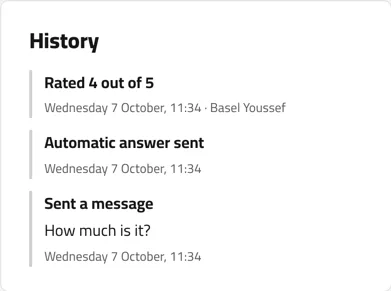
A customer’s history in the office: they sent “How much is it?” and the automatic reply went out the same minute. Example with sample names.
02

Every customer has a file

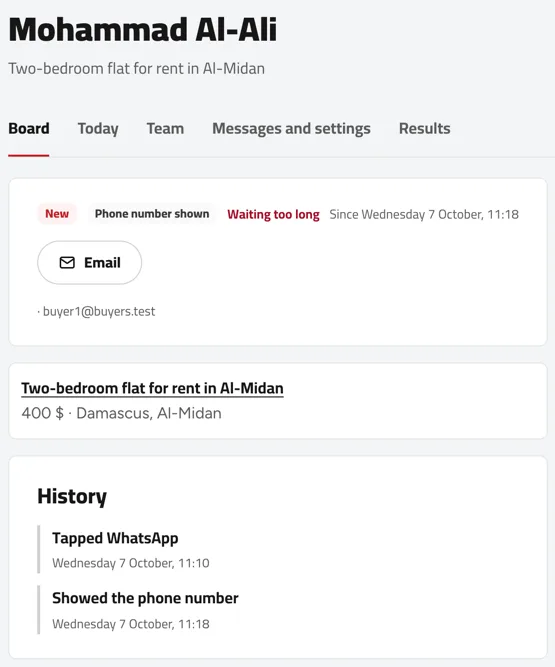
Who revealed your number, who opened WhatsApp, who saved the property: every contact is logged in the customer’s file with its time. You know who you are talking to and what they asked about before you answer.

A customer file: their stage, how they got in touch, the property they asked about, and the times they revealed the number and tapped WhatsApp. Example with sample names.
03

Who is waiting, and for how long

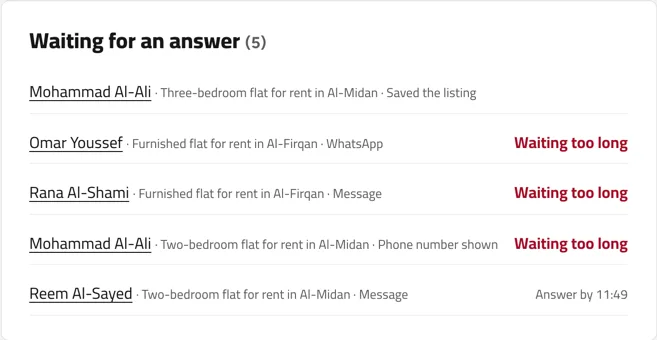
Next to every customer is the time to answer by; anyone kept waiting is marked “Waiting too long” and you get a reminder. If the person handling them is busy, pass the customer to a colleague in one tap and the whole file goes with them.

The “Waiting for an answer” list: each customer with the property and how they got in touch, the late ones marked in red. Example with sample names.
04

Viewings booked, with reminders

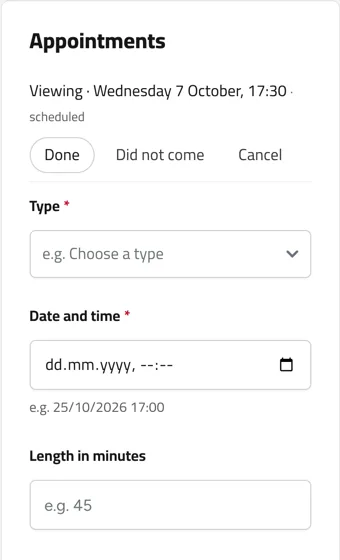
Book the viewing from the customer’s file. They get it by email with a calendar invitation, you and they get reminders a day and an hour before, and the viewing stays in the customer’s history.

Appointments in a customer file: a booked viewing with Done, Did not come and Cancel, and the form to book another. Example with sample names.
05

Your customers who want this property

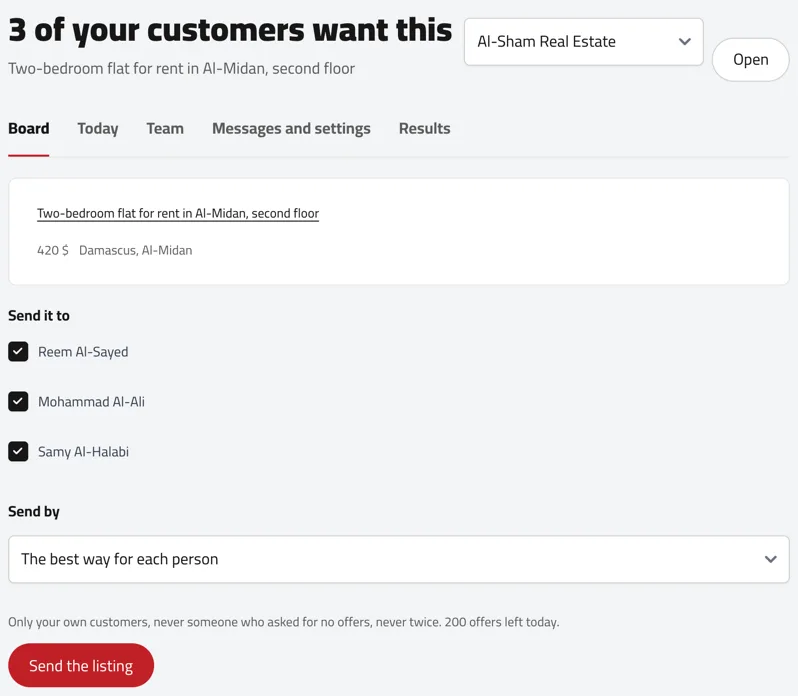
When you add a property that matches what earlier customers asked for, the office tells you how many of them want it, and you send it to them from one place.

The page “3 of your customers want this” for a new flat, with the customers’ names and the send button. Example with sample names.
06

The demand board and your results

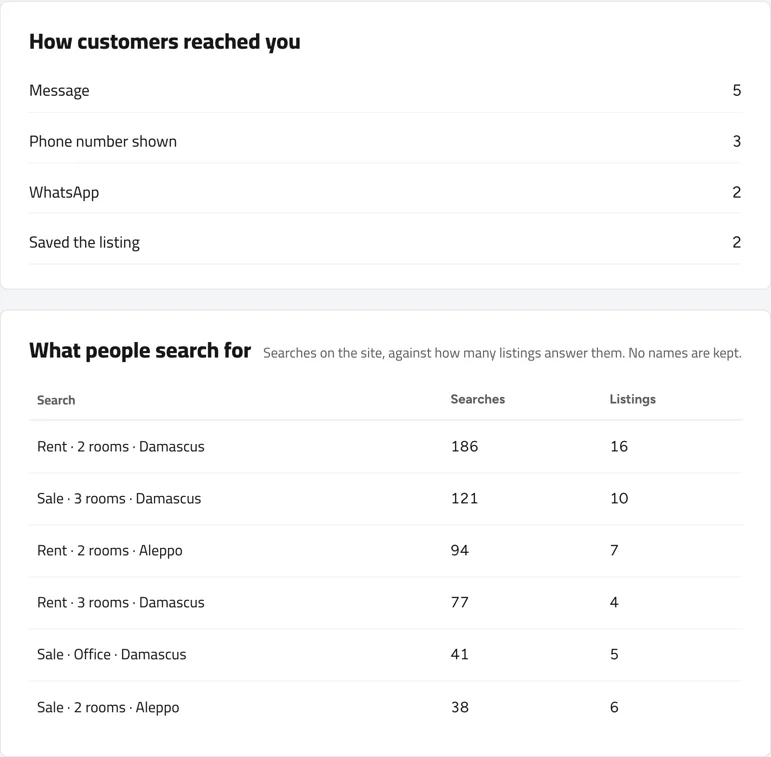
See what people search for on homes.sy against how many properties are listed for each search, where your customers come from (a message, a revealed number, WhatsApp or a save), and each listing’s views and requests.

The results page: how customers reached you, and what people search for with the number of searches and of listings available. Sample figures.
07

Your agency team

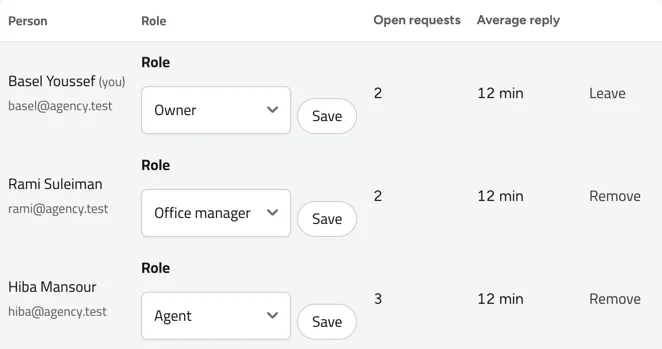
Invite your staff by email and give each a role: owner, office manager or agent. Every customer has someone in charge, and you know who answered and when.

The team page: each person with their role, open requests and average reply time. Example with sample names.

Before

A day at the agency, without a board

  • “.” · a comment on the Mazzeh flat
  • “How much is the rent?” · no reply
  • Missed call
  • “Can I see it today?” · WhatsApp
  • Missed call
  • “DM me” · and they never came back

After

The same day, in the agency office

Everyone who asked is a card: which property, how they got in touch, when they need an answer, and who on your team is following up.

The office board: New, Contacted, Viewing and Negotiating columns, each card with the customer, the property, how they got in touch and who handles them. Example with sample names.

On your phone

The office in your pocket

The office works in full in your phone’s browser: answer, open a customer’s file, book their viewing and pass them to a colleague without opening a computer. And every new customer reaches you by email the moment they arrive.

Download on the App Store Get it on Google Play
A customer file on a phone: their stage, how they got in touch and the property they asked about. Example with sample names.
The “New” column of the office board on a phone. Example with sample names.

How to start

Three steps, and you start today

  1. 1Create the agency accountWith your agency’s name, phone number and area.
  2. 2Add your properties and your teamEvery property you publish starts gathering the people who ask about it in the office.
  3. 3Install the appTo keep up with your properties and customers from your phone, even during a viewing.

Questions

Before you start

Is it free?

Yes, the agency office is free for now.

Who sees my customers?

Only you and the people you add to your agency’s team. No other agency sees your customers or their details.

Do I need the app?

No. The office works in full in the browser, on a computer or a phone, and every new enquiry also reaches you by email.

The next person asking about your property is typing right now.

Open the agency office and turn every question into a viewing.